
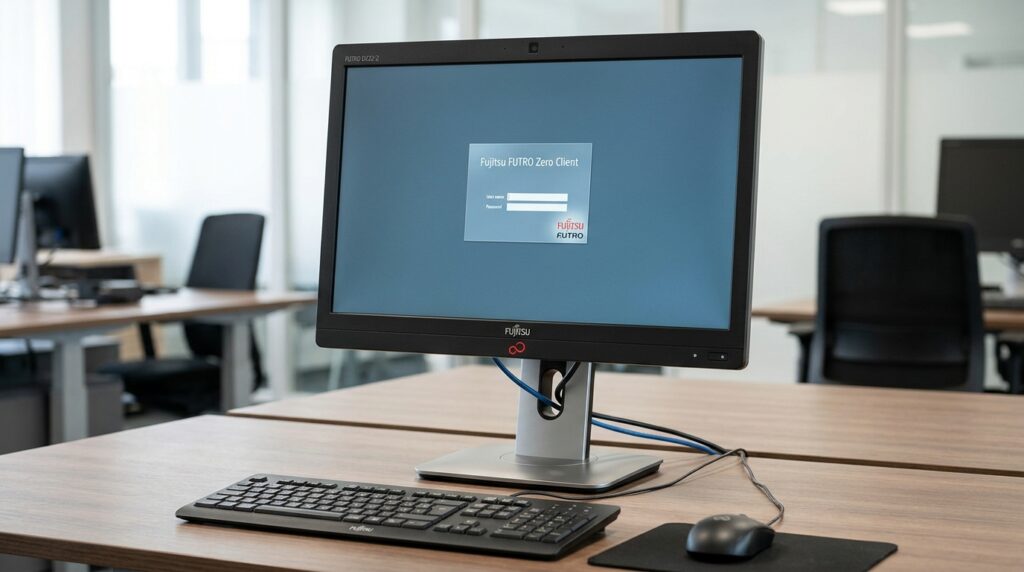

Technology continues to change the way businesses manage computers, workplace environments, and everyday operations. Organizations are increasingly looking for practical solutions that simplify IT management, improve security, and reduce the expenses associated with maintaining traditional desktop computers. One interesting device developed with these priorities in mind is the Fujitsu Zero Client DZ22-2.
The Fujitsu Zero Client DZ22-2 is a specialized 22-inch display designed for virtual desktop environments. Unlike an ordinary desktop computer, it does not depend on an integrated processor or local storage to provide a complete computing experience. Instead, it connects users to centrally managed virtual desktops hosted on a compatible server infrastructure.
This approach makes the device particularly interesting for organizations that need to manage multiple workstations from a central location. Educational institutions, financial organizations, corporate offices, and other professional environments can benefit from the simplified hardware design associated with zero client technology.
Beyond its virtualization capabilities, the Fujitsu DZ22-2 offers an adjustable ergonomic stand, an LED-backlit display, USB connectivity, integrated speakers, and Power over Ethernet support. These features make it a distinctive option for businesses exploring centralized computing solutions.
In this article, we will explore the Fujitsu Zero Client DZ22-2, including its specifications, important features, connectivity options, practical applications, advantages, and considerations before purchasing.
What Is the Fujitsu Zero Client DZ22-2?
The Fujitsu Zero Client DZ22-2 is a 22-inch display-based zero client developed for organizations using desktop virtualization technology.
To understand its purpose, it helps to distinguish between a conventional desktop computer, a thin client, and a zero client.
A traditional desktop computer contains its own processor, memory, storage, and operating system. A thin client typically uses limited local computing resources while relying on centralized servers for many applications and services.
A zero client takes this concept further by minimizing local computing hardware. The Fujitsu DZ22-2 is designed to provide access to a virtual desktop hosted within a supported IT infrastructure.
This means the user’s applications, operating system, and primary data are managed through the central environment rather than stored directly on the workstation.
For businesses with several employees, this arrangement can simplify software deployment, system updates, and workstation management.
The DZ22-2 was designed to work with supported virtualization technologies from VMware, Citrix, and Microsoft. However, compatibility should always be checked against the exact server environment and software versions before deployment.
Fujitsu Zero Client DZ22-2 Specifications
The hardware specifications are an important part of understanding what this device offers. Although its primary purpose is virtualization, the display and connectivity features also contribute to its overall usefulness.
Here are some of the main specifications documented for the Fujitsu Zero Client DZ22-2.
| Specification | Details |
|---|---|
| Product name | Fujitsu Zero Client DZ22-2 |
| Display size | 22 inches (55.9 cm) |
| Display technology | LED backlight |
| Aspect ratio | 16:10 |
| Native resolution | 1680 x 1050 pixels |
| Brightness | 250 cd/m² |
| Typical contrast ratio | 1000:1 |
| Response time | 5 ms |
| Viewing angle | 170° horizontal and vertical |
| Color support | 16.7 million colors (Hi-FRC) |
| USB connectivity | 4 x USB 2.0 |
| Network connection | RJ45 Ethernet |
| Ethernet speed | 100 Mb/s |
| Additional display connection | DVI-I |
| Audio | Integrated stereo speakers |
| Headphone connection | 3.5 mm |
| Microphone connection | 3.5 mm |
| Power over Ethernet | Supported with compatible equipment |
| Ergonomic stand | 4-in-1 adjustable stand |
These specifications make the DZ22-2 a purpose-built workstation solution rather than a conventional monitor with a standard computer attached.
22-Inch LED Display for Everyday Productivity
One of the most noticeable features of the Fujitsu Zero Client DZ22-2 is its 22-inch LED-backlit display.
The screen offers a native resolution of 1680 x 1050 pixels with a 16:10 aspect ratio. This format provides additional vertical working space compared with traditional widescreen 16:9 displays of similar dimensions.
For office users, the extra vertical space can be useful when working with documents, spreadsheets, administrative applications, and browser windows.
The display also offers a typical brightness rating of 250 cd/m² and a contrast ratio of 1000:1. Its 5 ms response time supports ordinary desktop activities, while the 170-degree viewing angles help maintain visibility from different seating positions.
Although this resolution is suitable for many traditional business applications, it is important to remember that the DZ22-2 belongs to an older display generation. Users who regularly work with high-resolution graphics, detailed video editing, or modern high-refresh-rate applications may prefer a newer monitor.
Nevertheless, for general office environments and compatible virtual desktop systems, its display specifications provide a practical foundation.
Desktop Virtualization and Centralized Computing
The most distinctive characteristic of the Fujitsu DZ22-2 is its zero client architecture.
Traditional desktop computers require individual maintenance. Each workstation may need operating system updates, software installations, security patches, and hardware troubleshooting.
Managing these tasks across dozens or hundreds of computers can become complicated.
Desktop virtualization offers an alternative. Instead of installing and maintaining a complete computing environment on every workstation, an organization hosts virtual desktops on centralized servers.
Employees connect to their assigned virtual desktops through compatible client devices.
The Fujitsu Zero Client DZ22-2 was developed to support this type of environment.
Its benefits can include:
- Centralized software management.
- Simplified workstation deployment.
- Reduced local hardware requirements.
- Easier replacement of individual client devices.
- Centralized storage and administration.
- More consistent desktop environments across an organization.
The actual benefits depend on server capacity, network reliability, virtualization software, and the organization’s IT configuration.
Power over Ethernet Connectivity
Another interesting feature of the Fujitsu Zero Client DZ22-2 is its support for Power over Ethernet, commonly known as PoE.
PoE allows compatible network equipment to provide electrical power and network connectivity through a single Ethernet cable.
This can make workstation installations more organized, particularly in environments where many devices are installed across different rooms or departments.
For example, a company deploying multiple DZ22-2 units may benefit from reduced cable clutter and simpler workstation arrangements.
However, PoE functionality requires compatible power-sourcing equipment or an appropriate PoE midspan. Connecting the device to an ordinary Ethernet port does not automatically provide power.
Before purchasing or installing the monitor, organizations should verify that their network infrastructure supports the required PoE configuration.
The device also provides a conventional power connection for installations that do not use PoE.
USB Connectivity and Peripheral Support
A professional workstation needs more than a display. Employees also require access to keyboards, mice, headsets, and other peripheral devices.
The Fujitsu DZ22-2 includes four USB 2.0 downstream ports, providing connectivity for supported accessories.
These ports can help users connect everyday office peripherals within a virtual desktop environment.
However, zero client devices do not necessarily support every USB device in the same way as a conventional computer.
Peripheral compatibility can depend on the device firmware, virtualization platform, server configuration, and USB redirection policies.
Organizations should therefore test important equipment before deploying the DZ22-2 across an entire workplace.
For standard office peripherals, the available USB connectivity provides a useful starting point.
Integrated Audio Features
The Fujitsu Zero Client DZ22-2 also includes built-in audio functionality.
Its integrated stereo speakers allow users to listen to supported audio without requiring separate desktop speakers.
The device provides dedicated audio connections for headphones and microphones, which can be useful for everyday communication and audio playback.
These features may be particularly relevant in office environments where employees use virtual desktop applications for administrative work, online communication, and other routine tasks.
As with USB peripherals, actual microphone and audio functionality should be tested within the intended virtualization environment.
Ergonomic Design and Adjustable Stand
Workplace comfort is an important consideration when selecting desktop equipment.
The Fujitsu DZ22-2 features a 4-in-1 ergonomic stand designed to provide flexibility for different workstation arrangements.
Its documented adjustment capabilities include:
- Height adjustment of up to 110 mm.
- 90-degree screen rotation for portrait viewing.
- Tilt adjustment from -5 to +35 degrees.
- Swivel adjustment of up to 340 degrees.
These adjustments allow users to position the display according to their desk setup and viewing preferences.
Portrait orientation can be helpful when reviewing long documents, while height and tilt adjustments can improve viewing comfort during extended working sessions.
The monitor also supports VESA-FPMPMI-compatible mounting, providing additional installation flexibility where compatible mounting equipment is available.
Energy Efficiency and Power Consumption
Energy consumption is another important consideration for businesses operating multiple workstations.
The Fujitsu DZ22-2 was designed with energy-conscious operation in mind. Its specifications include an ECO mode, a dedicated ECO button, and an ECO status indicator.
According to its product data sheet, the device consumes approximately 34 watts in ECO mode and up to 39 watts at maximum brightness with a mouse and keyboard connected.
Its documented power consumption in power-saving mode is below 0.5 watts.
These features can help organizations monitor and manage electricity usage across their workstation installations.
However, total energy savings depend on the complete computing environment. Server equipment, networking hardware, cooling systems, and the number of active virtual desktops must also be considered when evaluating overall operating costs.
Security Benefits of Zero Client Technology
Security is an important reason organizations consider zero client solutions.
With a traditional desktop computer, files and applications may be stored directly on individual machines. This can create additional security and maintenance responsibilities.
A zero client environment can reduce some of these risks by keeping primary operating systems, applications, and user data within centrally managed infrastructure.
The Fujitsu DZ22-2 was designed around this centralized computing approach.
Potential advantages include:
- Reduced local data storage.
- Centralized access management.
- Consistent security configurations.
- Easier administration of software updates.
- Reduced exposure associated with locally stored business information.
It is important to understand that a zero client is not a complete security solution by itself.
Organizations still need appropriate network protection, authentication policies, server security, access controls, and regular maintenance.
The security benefits ultimately depend on how the entire virtual desktop infrastructure is designed and managed.
Where Can the Fujitsu Zero Client DZ22-2 Be Used?
The DZ22-2 was developed primarily for business environments where multiple users access centrally managed computing resources.
Its design makes it relevant to several types of organizations.
Corporate Offices
Large offices often operate many workstations that require similar software and security configurations.
A centralized desktop environment can simplify administration and reduce the effort involved in maintaining individual computers.
The DZ22-2 can serve as a workstation endpoint within a compatible virtual desktop deployment.
Educational Institutions
Schools, colleges, and universities frequently manage computer laboratories with numerous workstations.
A centralized computing model can help IT departments maintain consistent user environments and manage applications from a central location.
The DZ22-2 may be suitable for compatible educational environments, provided the server infrastructure and software requirements are met.
Banking and Financial Organizations
Financial institutions require carefully managed computing environments and consistent security policies.
Zero client technology can support centralized administration and reduce the amount of business information stored locally on workstation devices.
The Fujitsu DZ22-2 was marketed for environments such as banks and other organizations that benefit from desktop virtualization.
Call Centers
Call centers commonly operate large numbers of workstations with similar software requirements.
A centralized virtual desktop environment can make it easier to configure employee accounts, deploy applications, and replace faulty workstation equipment.
The DZ22-2’s integrated display and client functionality provide a compact workstation arrangement for compatible deployments.
Government Offices
Government departments often manage multiple users who need access to standardized applications and centrally administered information systems.
A zero client approach can help simplify endpoint management while supporting centralized data handling.
However, any government deployment must meet the organization’s specific security, compliance, and infrastructure requirements.
Advantages of the Fujitsu Zero Client DZ22-2
The Fujitsu DZ22-2 has several characteristics that make it interesting for its intended purpose.
1. Integrated zero client design
Its zero client architecture provides access to compatible virtual desktop environments without relying on a conventional local PC.
2. Practical 22-inch display
The 1680 x 1050 resolution and 16:10 aspect ratio offer a useful workspace for traditional business applications.
3. Centralized administration
The device is designed to work with virtual desktop infrastructure, allowing organizations to manage computing resources centrally.
4. Power over Ethernet support
Compatible PoE equipment can simplify installation by combining network connectivity and electrical power through one cable.
5. Flexible ergonomic stand
Height adjustment, tilt, swivel, and portrait rotation provide useful positioning options.
6. Integrated speakers and USB ports
The built-in audio system and four USB 2.0 ports provide connectivity for supported everyday peripherals.
7. Reduced local hardware complexity
Its lack of a conventional processor and integrated storage reduces the number of local components that would otherwise require maintenance.
Important Things to Consider Before Buying
Although the Fujitsu Zero Client DZ22-2 offers several useful features, buyers should consider its age and specialized design before making a purchasing decision.
This is not a modern all-purpose desktop computer. It is a dedicated zero client intended for compatible virtual desktop infrastructure.
Here are some important points to review.
Check Virtualization Compatibility
The original device documentation identifies VMware, Citrix, and Microsoft virtualization environments as supported platforms.
However, this does not mean that every modern version of these technologies will work with the device.
Check the exact firmware, controller software, server configuration, and protocol compatibility before deployment.
Understand the Display Resolution
The native resolution is 1680 x 1050 pixels.
This is suitable for many traditional office applications, but it is less detailed than modern Full HD and higher-resolution monitors.
Users who need additional screen detail should compare newer alternatives.
Verify PoE Requirements
The device supports PoE with compatible equipment.
Make sure the required power-sourcing hardware or midspan is available before planning a PoE-based installation.
Consider the Availability of Replacement Parts
Because the DZ22-2 is an older product, buyers should check the condition of used units, power accessories, stands, cables, and replacement components.
Inspecting a second-hand device before purchase is especially important.
Evaluate Long-Term Software Support
A successful zero client deployment depends on more than the physical hardware.
Organizations should confirm that the necessary management software and virtualization infrastructure remain available and supported for their intended use.
Is the Fujitsu Zero Client DZ22-2 Still Worth Considering?
Whether the Fujitsu Zero Client DZ22-2 is worth considering depends largely on the intended application.
For organizations that already operate a compatible legacy virtual desktop environment, it may provide a practical way to maintain an existing workstation setup.
Its integrated display, ergonomic adjustments, PoE support, and simplified hardware architecture remain interesting characteristics.
However, buyers planning a completely new virtual desktop deployment should compare the DZ22-2 with newer thin clients, modern zero clients, and conventional business monitors.
Newer equipment may offer higher display resolutions, faster networking, improved peripheral compatibility, and better long-term software support.
For individual home users, the device may be less convenient because it is not designed to function as an independent Windows desktop computer.
Understanding this distinction is essential before purchasing one.
Final Thoughts
The Fujitsu Zero Client DZ22-2 represents an interesting approach to workplace computing. Rather than functioning as a traditional desktop computer, it provides a dedicated interface for users who access centrally hosted virtual desktops.
Its 22-inch LED display, ergonomic stand, four USB 2.0 ports, integrated audio, and Power over Ethernet support make it a specialized workstation solution for compatible business environments.
The biggest advantage of this device is its centralized computing design. Organizations can reduce endpoint hardware complexity while managing applications, operating systems, and user information through their server infrastructure.
Nevertheless, its older hardware specifications and dependence on compatible virtualization technology are important considerations.
For businesses maintaining an existing supported infrastructure, the Fujitsu Zero Client DZ22-2 may still have practical value. For new deployments, careful compatibility testing and comparison with modern alternatives are recommended.
Ultimately, the DZ22-2 is best understood as a purpose-built virtual desktop endpoint rather than an ordinary computer monitor. Its value comes from how effectively it integrates into a properly configured centralized IT environment.